
Lesson 2 — Demo 2: Structured Data Extraction from Documents
Unit 2 | Lesson 2 of 2
By the end of this lesson, you will be able to:
- Explain why some organisations cannot — or should not — use third-party no-code platforms for certain workflows
- Describe the components of a Python-based document extraction pipeline at a conceptual level
- Identify the types of data sensitivity and infrastructure considerations that should inform tool selection
- Recognise how the same AI capability (structured extraction) can be implemented at different technical levels depending on organisational context
Why are we showing you a technical demo?
Before we look at what this workflow does, it is worth spending a moment on why it exists in this form — because this is a question you will face in your own practice.
In Lesson 1, the feedback analysis workflow ran entirely on Power Automate — a Microsoft’s workflow automation product within the Power Platform. That approach is fast to configure, requires no code, and is perfectly appropriate for many organisations and many use cases.
But not all of them.
Some organisations cannot send their data to third-party platforms at all. This is not just a technical preference — for many sectors, it is a legal and regulatory requirement. Consider:
- A law firm processing client contracts. Those documents contain legally privileged information. Sending them through a cloud automation platform may constitute a breach of professional confidentiality obligations.
- An NHS trust or private healthcare provider dealing with patient records. GDPR and the Data Security and Protection Toolkit govern where patient data can travel. A third-party connector in Make.com is unlikely to meet those standards without significant governance controls.
- A financial services organisation processing transaction documents or client agreements. FCA regulations, PCI DSS, and internal data classification policies may prohibit routing sensitive financial data through external SaaS platforms.
- A defence or government contractor working with documents that carry security classifications. The answer is simply: those documents do not leave the internal network.
In these contexts, the organisation needs to build the workflow itself — using its own infrastructure, its own compute, and its own validated data pipelines. That means code. Specifically, that usually means Python, because Python has the richest ecosystem of AI and automation libraries available.
📌 This is a core practitioner judgement: knowing not just what a tool can do, but whether it is appropriate to use it in a given organisational context. Recommending a third-party no-code platform for a use case involving sensitive or regulated data — without checking whether that is permissible — is a significant and avoidable mistake. Part of your role is asking those questions before recommending a solution.

What this demo is about
The business problem: A finance or operations team receives a regular flow of PDF documents — invoices, purchase orders, contracts, statements — and needs to extract specific data fields from each one to populate an internal database or spreadsheet. Doing this manually is slow, error-prone, and scales badly as document volume grows.
The approach: A Python script running on the organisation's own infrastructure — no data leaving the internal network, no third-party platform involved.
The type of workflow: Advanced technical. This demo involves code, but you are not expected to understand every line of it. Your goal is to understand the architecture — what each component does and why — so that you can have an informed conversation with a technical team about building something like this, and so you can identify when this type of approach is the right one for a problem you are trying to solve.
How the pipeline runs — step by step
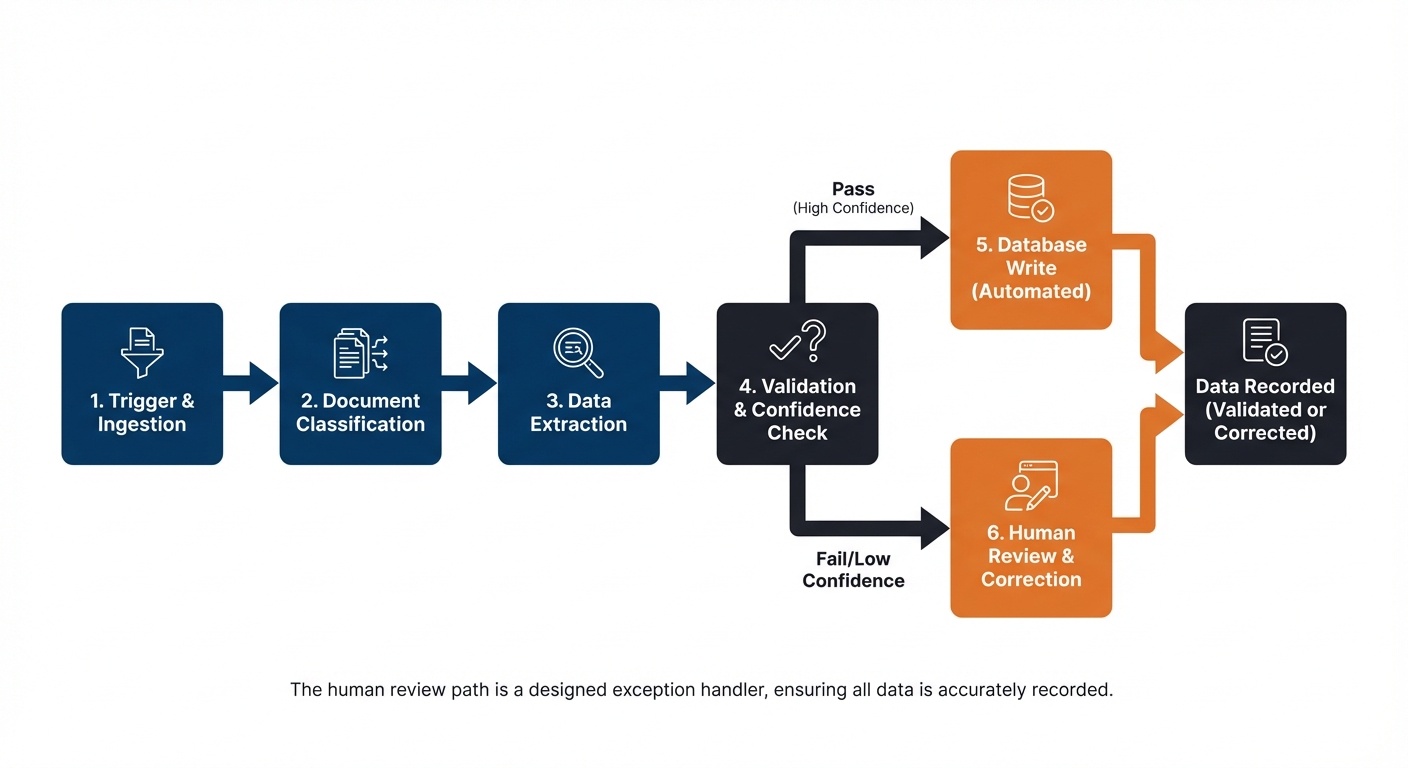
Step 1 — Trigger: folder watcher A Python script monitors a designated folder on the organisation's network. When a new PDF document is dropped into the folder, the script detects it and begins processing automatically. No human needs to kick it off — the arrival of the document is the trigger.
Step 2 — PDF text extraction The script reads the PDF and extracts its text content. This step handles the conversion of a document — which a computer sees as an image or formatted file — into plain text that can be passed to a language model. Libraries like PyMuPDF or pdfplumber handle this.
Step 3 — LLM API call with structured extraction prompt The extracted text is sent to a language model via API — for example, the OpenAI API, Azure OpenAI, or an internally hosted model — along with a carefully designed prompt. The prompt instructs the model to read the document text and return specific fields in a consistent JSON format: for example, supplier name, invoice number, invoice date, line items, total amount, and payment terms.
The key word here is structured. The prompt is engineered to produce output in a predictable, machine-readable format — not a prose summary. This is what makes the next steps possible.
Step 4 — JSON output validation The script checks the model's response. Does it contain all the required fields? Are the data types correct — is the date in the right format, is the total a number rather than a string? Are any fields missing or flagged as uncertain by the model?
This validation step is critical. Without it, a poorly structured or incomplete response from the model would silently corrupt the database. The validation layer catches problems before they propagate.
Step 5 — Database write If the output passes validation, the extracted data is written to the organisation's internal database or spreadsheet. The document is archived. The process is logged with a timestamp and the document identifier.
Step 6 — Human review flag for low-confidence results If the validation step identifies problems — missing fields, low model confidence scores, or a document format the script has not seen before — the document is not written to the database automatically. Instead, it is flagged and routed to a human reviewer. The reviewer sees the document alongside the model's partial extraction and can complete or correct the fields manually.
This is the human-in-the-loop mechanism in a technical pipeline. Rather than a visual approval gate in a no-code platform, it is a conditional branch in the code: if confidence is below threshold, route to human review queue.
What is different about this approach compared to Demo 1?
| Demo 1 (No-Code) | Demo 2 (Python Pipeline) | |
|---|---|---|
| Platform | Make.com / Power Automate | Python on internal infrastructure |
| Data leaves the org? | Yes — to cloud platform | No — stays on internal network |
| Requires code? | No | Yes |
| Build time | Hours to days | Days to weeks |
| Best suited for | Non-sensitive data, fast deployment | Sensitive/regulated data, existing DB infrastructure |
| Human oversight | Visual approval gate | Conditional flag and review queue |
| Auditability | Platform logs | Custom logging — fully controllable |
Neither approach is inherently better. The right choice depends on the data involved, the organisation's infrastructure, the regulatory environment, and the technical capacity of the team delivering it.
💬 Reflection
Think about a document-heavy process in your organisation — contracts, reports, invoices, applications, or similar. What data does it contain? Would that data be appropriate to process through a third-party platform, or would an in-house approach be required?
If you are not sure, who in your organisation would you ask to find out? Knowing who to ask is as important as knowing the answer.

📝 Activity 1 — Observation Sheet: Demo 2
Complete during or immediately after the video | Part of your Unit 2 Workbook
Work through these questions for Demo 2 specifically. Add your responses to the Observation Sheet section in your Unit 2 Workbook.
1. What is the trigger for this workflow? What starts it?
2. What data does the workflow need, and where does it come from?
3. Where does the AI component sit in the pipeline, and what specifically does it do? What does the structured output look like?
4. Where does a human need to be involved, and what condition triggers that human review?
5. What could go wrong in this pipeline — at which steps — and how does the design handle or fail to handle those risks?
6. What business problem does this solve, and how would you begin to measure the value it creates?
Workplace connection: Does your organisation process documents — invoices, contracts, reports, applications — in a way that involves significant manual data entry or extraction? Is the data involved sensitive or regulated? Note your initial thoughts on whether a no-code or in-house approach would be more appropriate for your context.
✅ Unit 2 complete. You have now seen two workflow demonstrations — a no-code platform approach and a Python-based in-house pipeline. You are ready to move on to Unit 3.