
Lesson 1 — The Automation Lens: Seeing Your Work as Processes
Unit 3 | Lesson 1 of 3 | Estimated time:~30 minutes
By the end of this lesson, you will be able to:
- Explain what a process is in precise terms, including its inputs, steps, outputs, triggers, and exceptions
- Apply the readiness test to determine whether a task is a candidate for automation
- Identify the categories of work most and least suited to AI and automation
- Distinguish between automating a broken process and automating a well-designed one
From tasks to processes
In Unit 2, you watched four complete workflow demonstrations. Each one started not with a tool or a platform, but with a clearly described business problem: a defined type of input arriving at a predictable frequency, a set of steps applied to that input, and a specific output produced at the end. That precision was not incidental. It was the foundation on which everything else was built.
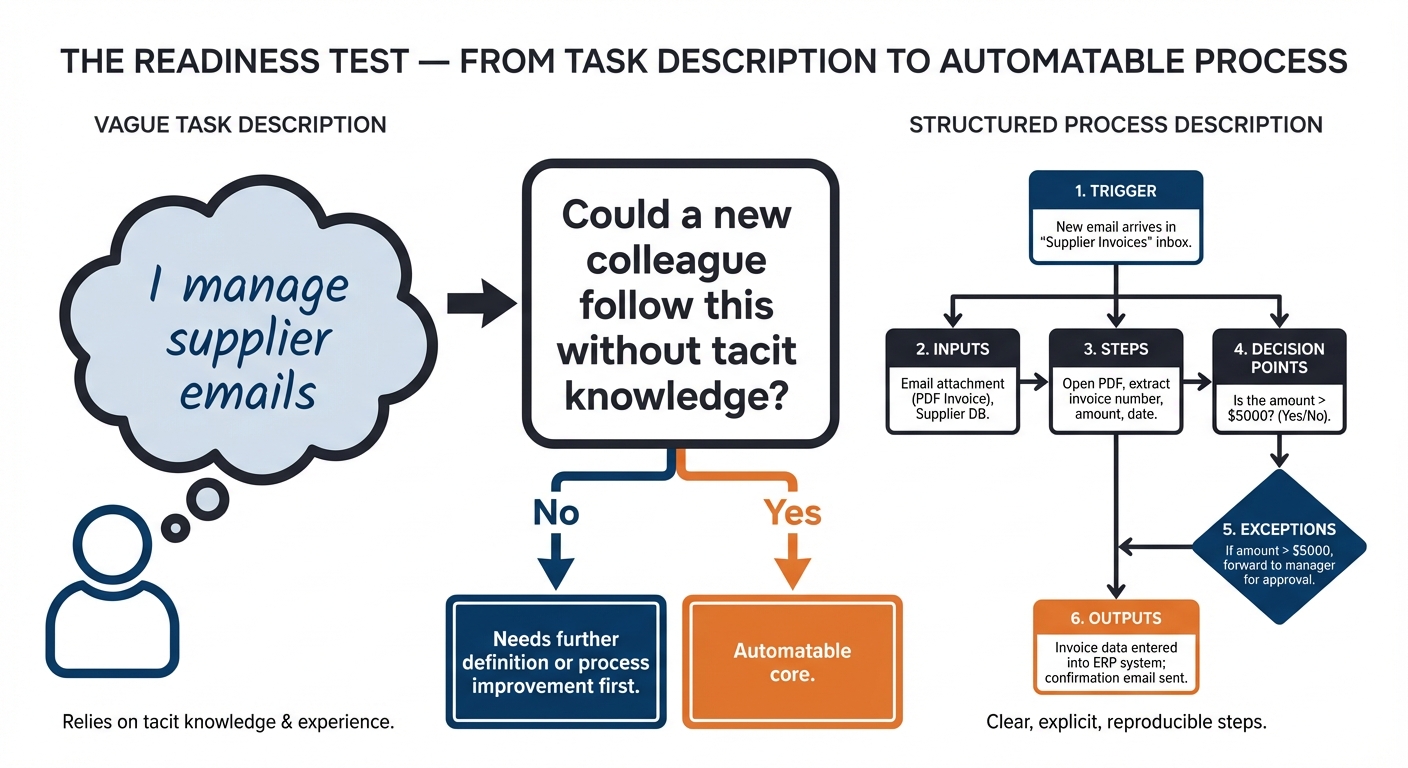
Most people, when asked to describe their work, talk in terms of tasks: "I manage emails," "I write reports," "I deal with customer queries." These descriptions are true but they are not useful for automation thinking. A task is a label. A process is a structure. The shift from one to the other is the single most important intellectual move in this unit, and it is worth spending time on.
A process has six defining characteristics. It has a trigger — the event that starts it. It has inputs — the data, documents, or information it requires in order to run. It has a sequence of steps — the actions performed, in order. It has decision points — moments where the next action depends on a condition being true or false. It has outputs — what is produced at the end. Finally, it has exceptions — the variations and edge cases that fall outside the standard path and require different handling.
Consider the difference between these two descriptions of the same work. The first: "I spend a lot of time on emails." The second: "Our team receives approximately 20 supplier enquiry emails per day. Each email is read, classified into one of five standard categories, and either answered from a template or escalated to a senior colleague. The output is a logged response within 24 hours. Around 15% of emails do not fit the standard categories and require manual judgement." The second description is a process. You can see where automation might help — the classification step, the template matching, the logging — and where human judgement remains essential. You cannot see any of that in the first description.
💬 Reflection
Think of one task you do regularly and see whether you can describe it as a process. What triggers it? What information do you need before you can start? What steps do you follow? What do you produce? Where do you have to make a judgement call?
If you find it difficult to answer these questions precisely, that is useful information. It suggests the task contains more tacit knowledge — unwritten, intuitive expertise — than you might have assumed.
The readiness test
There is a simple, practical test for whether a task is likely to be automatable. Ask yourself: could you describe this task to a new colleague, step by step, precisely enough that they could follow your instructions and produce the same output you would — without relying on experience, context, or instinct they have not yet built?
If the answer is yes, the task probably has an automatable core. If the answer is no — if you find yourself saying "it depends," or "you just know when you have seen enough of them," or "the system does not always behave the same way" — those are signals of complexity or variability that need to be understood and often resolved before automation becomes viable.
This is the readiness test, and it is worth applying early. It does not tell you that automation is the right choice, only that automation is possible in principle. Whether it is the right choice depends on the five-dimension framework you will apply in Lesson 2.
What is well-suited to AI automation
Certain categories of work appear again and again as strong candidates for AI and automation, and it is useful to know them before you start surveying your own organisation.
Document processing covers reading, extracting data from, classifying, or summarising documents — invoices, reports, contracts, application forms, meeting notes. If your team spends significant time reading documents and pulling out specific pieces of information, this is one of the most reliably valuable areas for GenAI-assisted automation.
Communication drafting covers producing standard correspondence from structured inputs: customer responses, internal updates, rejection letters, follow-up emails. The key characteristic is that the output follows a recognisable pattern and the inputs are consistent enough to feed a prompt reliably.
Data extraction and entry covers taking information from one source and transferring it accurately to another — from an email into a CRM, from a form into a spreadsheet, from a document into a database. This has been done with traditional RPA for years; GenAI extends it to unstructured sources that RPA cannot handle.
Classification and routing covers assigning incoming items — emails, tickets, requests, complaints — to the right category, queue, or recipient. This is one of the tasks where GenAI offers the most immediate practical value, because it handles the natural language variation that makes rule-based classification brittle.
Reporting and summarisation covers condensing large volumes of information — feedback, data, activity logs, research — into structured outputs for decision-makers. GenAI is particularly strong here when the source material is varied in format or too voluminous to process manually at the required frequency.
Knowledge retrieval covers answering questions from a defined body of documentation — internal policies, product information, procedural guidance. When combined with retrieval-augmented generation (RAG), as you saw in Unit 1, this can significantly reduce the time staff spend searching for answers across multiple systems.
What is less well-suited
Automation is not universally applicable, and part of the practitioner role is being honest about where it is not appropriate — not just technically, but organisationally and ethically.
Processes that involve highly variable interpersonal interactions — where the human relationship, the reading of emotional cues, and the exercise of personal judgement are the substance of the work — are rarely good candidates. The value in those interactions is the human element itself, and removing it changes the nature of the service fundamentally.
Processes that require physical presence are outside the scope of software automation entirely. Processes where legally binding decisions must be made and signed off by a qualified person cannot have that sign-off automated away, even if the analysis supporting the decision can be assisted by AI. Processes that depend on inaccessible or inconsistent data — information that lives in people's heads, on paper, in legacy systems that cannot be queried, or in formats that vary so widely as to be unpredictable — face a data problem that needs solving before an automation problem can be addressed.
A critical warning: do not automate a broken process
There is a temptation, once you have identified an automation opportunity, to move straight to the question of how to automate it. Resist that temptation long enough to ask a prior question: is this a good process?
Automation amplifies what it automates. A well-designed process, automated, becomes faster and more consistent. A poorly designed process, automated, produces the same errors at greater speed and scale. If your team's customer complaint handling process currently has a step where responses are sent without review, automating that step does not fix the problem — it makes the same mistake a hundred times a day instead of ten.
The discipline of process improvement — identifying waste, simplifying steps, removing unnecessary decision points, fixing data quality issues — often needs to come before automation. In some cases, the act of describing a process precisely enough to evaluate it for automation is the moment you first clearly see how broken it is. That discovery is valuable in itself.

⏭️ Up next — Lesson 2: Now that you can see your work as processes, Lesson 2 gives you a structured framework for evaluating which of your candidate processes are genuinely worth pursuing — and why rigorous scoring beats gut instinct when making that call.