
Lesson 3 — AI in Your Organisation: Starting to Look
Unit 1 | Lesson 3 of 4 Estimated time: ~30 minutes
By the end of this lesson, you will be able to:
- Describe how AI adoption typically happens in organisations — and where yours might sit
- Apply basic prompting principles to get more useful outputs from a GenAI tool
- Identify initial productivity opportunities in your own role using four practical lenses
How AI adoption typically happens
In most organisations right now, AI adoption is happening in two directions at once — and often with very little coordination between them.
Bottom-up adoption is when individual employees discover tools on their own — often using personal accounts of ChatGPT or similar — and start using them to get work done faster. This happens quietly. Sometimes brilliantly. Sometimes in ways that create real data governance risks, because people are pasting work content into non-approved consumer tools without realising the implications.
Top-down adoption is when leadership sets a strategy, procures approved tools (Microsoft Copilot is the most common in UK enterprises right now), and attempts a managed rollout — with policies, governance frameworks, and some form of training programme.
Most organisations are somewhere in the middle: a top-down strategy that is either just starting or partially deployed, alongside a messy reality of individual bottom-up experimentation that is already happening.
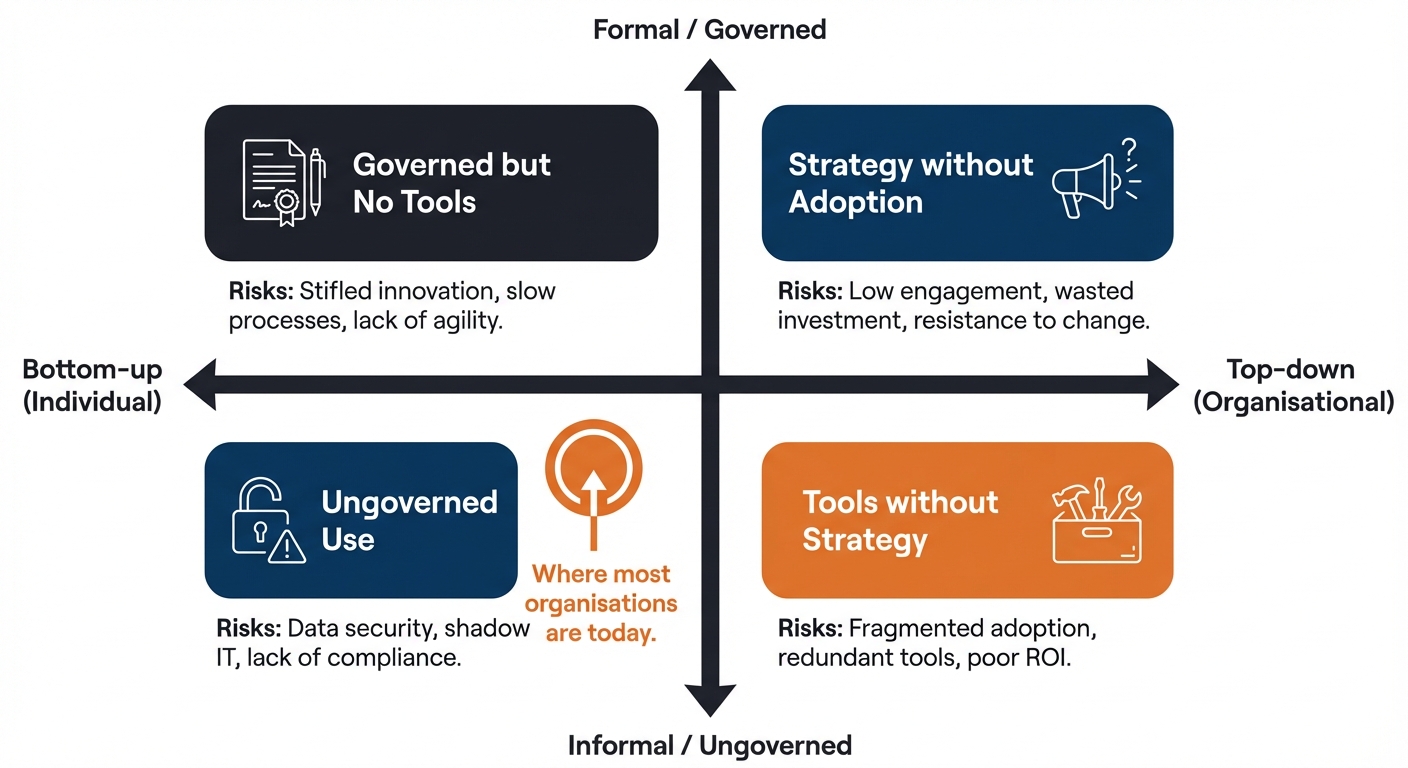
Neither direction is inherently bad — the organisations that do this well tend to harness bottom-up energy while providing top-down structure and governance to keep it safe. As a practitioner, you will often be the bridge between those two worlds.
💬 Reflection
Based on what you have observed so far: where does your organisation sit on this spectrum? Is AI adoption happening informally around you, formally from the top, or both at once — without much connection between the two?
There is no right answer. What matters is that you can see it clearly.
Prompting basics — interacting effectively
Using a GenAI tool effectively is a skill, and like most skills it improves with deliberate practice. A vague prompt produces vague output. A well-constructed prompt — with clear context, a specific goal, and guidance on format or tone — produces dramatically better results.
A few principles to start with:
Be specific about what you want. "Write an email" is a poor prompt. "Write a short email to a non-technical colleague explaining why we need to delay the system upgrade by two weeks, using a reassuring tone and avoiding jargon" is a much better one. The more specific the instruction, the more useful the output.
Provide context. The model has no access to your organisation, your role, your audience, or your situation unless you tell it. The more relevant context you include in your prompt, the more relevant the output will be.
Iterate. Treat your first prompt as a starting point, not a final ask. If the output is not quite right, refine it. "That is a good start — can you make it shorter and more direct?" or "The tone is too formal — can you rewrite it for a colleague I know well?" This back-and-forth is where a lot of the real value comes from.
Test critically. Always read the output and ask: is this accurate? Does it make sense in my context? What would I need to verify? Never paste a GenAI output into a document or send it without reading it properly.
The four lenses for spotting productivity opportunities
As you start to look at your own role and organisation, it helps to have a simple framework for categorising where AI and automation might add value. There are four lenses worth applying:
1. Reduce waste — Where does your team spend time on tasks that add no direct value? Duplicate data entry, reformatting documents that have already been produced elsewhere, manual chasing and follow-up that could be triggered automatically.
2. Improve processes — Where are there bottlenecks, inconsistencies, or handover points that slow things down or introduce errors? Could any of these be streamlined or partially automated?
3. Increase satisfaction — Where do colleagues or customers experience friction, delays, or frustration? Are there interactions that could be made faster, clearer, or more consistent with the right tool?
4. Optimise outcomes — Where could better use of data or AI analysis improve the quality of decisions, reduce errors, or surface insights that are currently being missed?
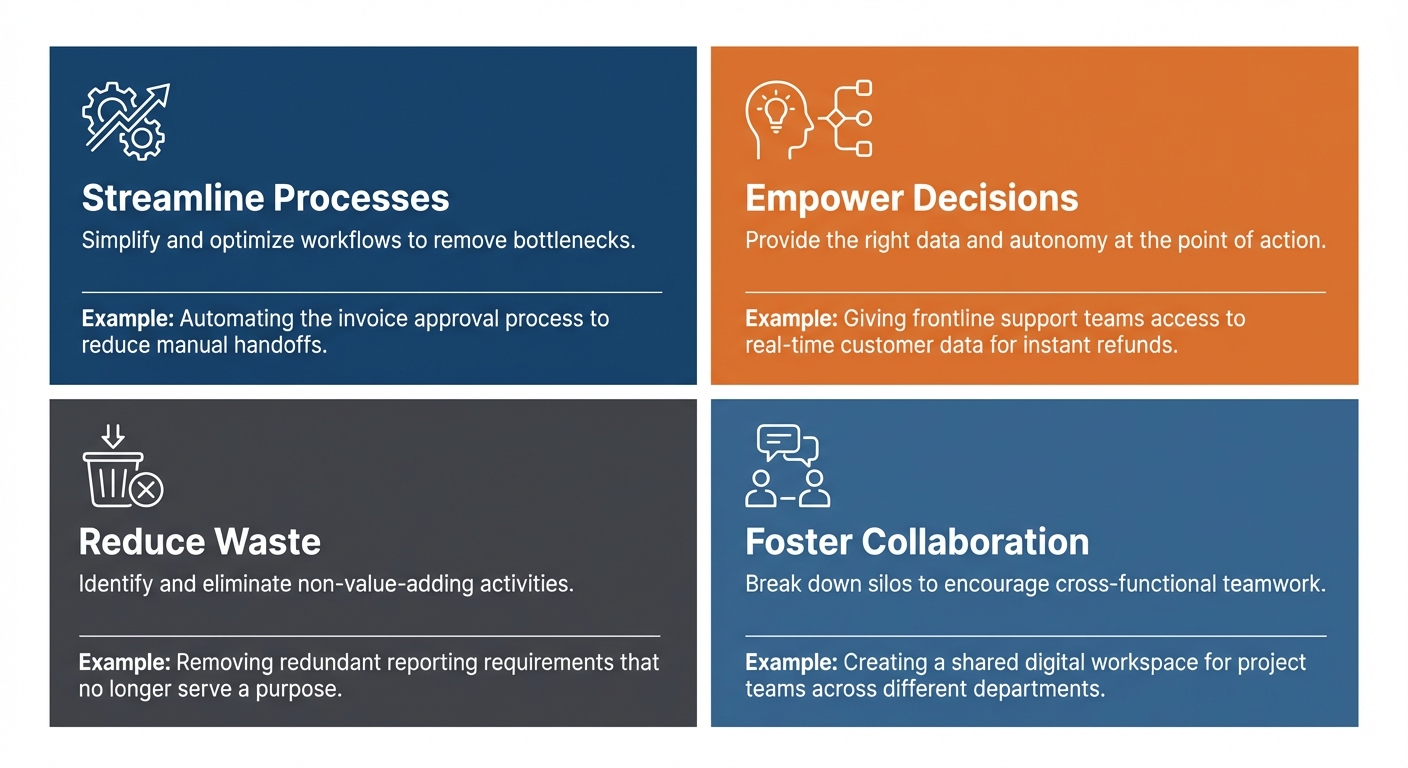
You do not need to have answers yet — the goal at this stage is simply to start looking. Over the coming weeks, you will apply these lenses more systematically to your own role and organisation as part of your project work.

📝 Activity 3 — Workplace AI Landscape Scan
Complete before your coaching session | Estimated time: 30 minutes
Spend 30 minutes doing a basic scan of your organisation's current relationship with AI. Use the prompts below to guide your notes, and record your findings in your Unit 1 Workbook.
What to look for:
- Is your organisation using any AI tools already — officially, or informally by individuals?
- Are there any policies, guidance documents, or acceptable use guidelines about AI?
- Have a brief, informal conversation with one or two colleagues: have they used AI tools for work, even on their own initiative? What was their experience?
What to conclude:
Based on your scan, where would you place your organisation on this spectrum?
AI not on the radar <————————————> Active, managed AI adoption
Note your reasoning. You do not need a definitive answer — honest observations are what matter here.
Bring your notes to your next coaching session. They will use them to help you start identifying which parts of your role and organisation might be good candidates for your apprenticeship project.
⏭️ Up next — Lesson 4: You now have the vocabulary and the practical lenses. In the final lesson of this unit, we introduce the AI Fluency Framework — a model that ties everything together and gives you a practitioner identity to carry forward through the whole programme.